
A while back I posted about how I was going to begin uploading images to Flickr at a lower size than I have previously done. This process has been working fine – the JPEG images I upload are still plenty big enough, and I’ve kept the full-resolution original scans on my computer.
However, I’ve noticed today that the majority of my WordPress posts which feature images where I’ve replaced the original files on Flickr are now showing the photo description, rather than the embedded image. The links work fine, taking you to the Flickr version, and if I edit the posts, I can see the images displayed onscreen. But otherwise they are missing as in-line images from the posts, e.g. this post.
At first I wondered if it was a browser caching problem, but the same lack of pictures can be seen in multiple browsers on different devices. I also wondered if the URLs to the Flickr versions might have changes when I replaced the images on there, but they are identical. I’ve even edited the problem posts to remove the original links and replace them, but the same thing still occurs. Oddly, not all posts featuring images that I’ve replaced are affected, so the whole Flickr thing might be a big red herring!
I really dislike issues like this. They happen out of nowhere with no obvious cause and can take lots of meesing around to try to resolve them and I’m not in the mood to do so today. So, if you come across one of my posts that has a link rather than and in-line image, please accept my apologies. All new posts will hopefully be unaflicted, and I hope to fix the others when I get the time to figure out what exactly is going wrong.
Anyway… Here’s a picture of a nice thatched cottage at Sandsend (assuming it embeds into the post!)
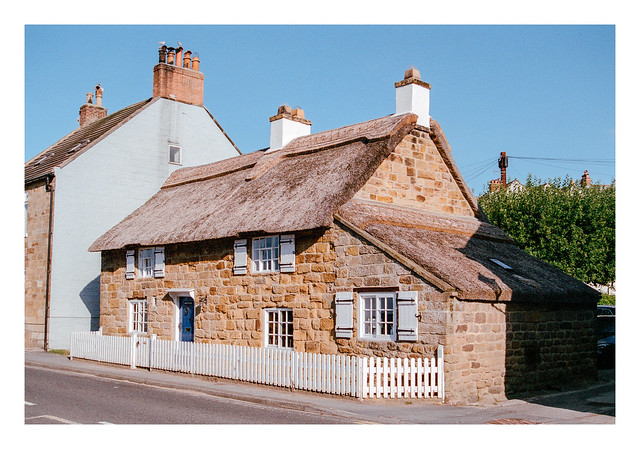
Nikon F80, Nikkor 28-80mm f/3.5-5.6 D & Fujifilm Superia Xtra 400. Lab developed. Home scanned and converted with Negative Lab Pro.
Taken on 29 July 2022

 Steel City Snapper photography
I’ve learned that you can’t assume that past-linked images will work when you replace an image on Flickr. I don’t understand why, either.
LikeLiked by 2 people
It’s very frustrating. I’ve even tried deleting the original link, saving the post, and then editing it again to insert the Flickr link afresh, still without success.
LikeLike
How do you create the flickr links?
I’ve been doing it this way:
1) Go to the image page on flickr
2) On the bottom right of that image “black bar” area, click on the download icon (arrow)
3) Choose “View all sizes”
4) Then right-click on the image and “copy image address”
I haven’t had issues doing it this way, as far as I can tell.
Oh yeah, I use the “image” block in WP vs “flickr” when I do single images. I only use the flickr block when I’m sharing an album.
LikeLiked by 2 people
Thanks. That does work, although it takes a bit longer (and it doesn’t automatically link to the Flickr version for anyone who wants to be able to click through and see it larger).
My usual method is…
1) Click the share link (curved arrow)
2) Select the Share tab in the box that appears
3) Copy the URL
4) Paste the URL directly into the blog post (no need to select a block – it does it automatically).
This method normally works fine (other than my reported issues of course!).
LikeLike
I’ve had a blog for close to 17 years. I do not recommend posting your image to Flickr and then linking to them from your blog. The problem is that if (when) Flickr makes a change, every image on your website will be affected. I’ve learned this the hard way. I think uploading your pictures to your blog is the best solution.
There is no need for large images. Most images are viewed via mobile devices. I’m typing this response on an iPad. I recommend keeping your photos to 1200 pixels (or less) on the long side.
Do not build your house on someone else’s land.
LikeLiked by 2 people
I think that this is solid advice Khürt. My main issue is that I would have to start paying out each month for the increased storage that I would need – something I’m reluctant to do on top of all the other creeping subscriptions that I already pay out. Using Flickr for linked hosting is a risk, to be sure, but one that at this point I’ve chosen to accept.
I upload the images at a large size, mostly because that’s the way I want to see them myself (usually on a monitor), but I don’t want them to be so large that the extra resolution isn’t showing any benefit even on a large display.
LikeLike
Just so you know, anytime I find one of your images especially interesting, which is quite often, I always follow the link to the Flickr page where I then immediately proceed to view the image at the largest possible size, in a pixel perfect 1:1 manner (i.e. no scaling). Yes, I do this even on mobile devices. Obviously, you recently reduced the maximum size of your uploads to ~3000 pixels on the long side, which is fine, but I’m glad you didn’t shrink things any more than that. A 1200px image, on the long side (or even the short side), is a joke in my opinion.
No offense, Khürt, but when it comes to film images, I want to see the unique characteristics of the film used so I can appreciate and admire them, particularly the grain structure. That’s impossible to do with small images. As a result, I don’t even bother following film photographers who upload extremely low resolution images to their blogs, no matter how good I think their photography skills are or how interesting the subject matter is.
People have different reasons for following blogs. I get that. But my reason — and I assume others’ as well — is to admire what film is capable of, and the unique qualities of different stocks. If I can’t see those unique qualities, there’s no longer a point in me following a film photographer’s blog.
LikeLiked by 1 person
I chose the new image size mostly as it still retains the detail while reducing the size of the exported files. I tested a few resolutions before deciding on 3072 pixels (on the long side for 135, but the shortest side for 120 format images – I chose it firstly for medium format images and then decided to give 135 a bit extra). Bigger than that and there wasn’t much more to see on Flickr which, despite being pretty good at showing high-resolution images, still adds some compression I think – my local versions of the same files seem to have a little more detail, at least.
Hopefully they still provide plenty of detail to dig into. 🙂
LikeLike
Do as you like. The research that is out there on image sizes on the web, says you are in the minority. Mobile is winning.
LikeLike
After 10 years of blogging, I have only used 30% of the free 3Gb storage WordPress provides. I have a Lightroom export preset that exports at 1000px to a folder from which I upload to WordPress. However, I don’t blog anything like as often as you do.
LikeLiked by 1 person
I think I’ve used approx 23% of my 3Gb – around 100 images and I expect that I could reduce that considerably by re-sizing the images. I’ve got over 16 hundred posts now though so I’m not sure I would have enough space even by being more frugal with my upload sizes. The Flickr links are very convenient in this regard.
LikeLike
For 35mm, I think ~3000x2000px is generally a good size for online sharing. Some stocks could benefit from a higher resolution (TMX, ACROS, Pan F, Provia, Ektachrome, etc.), assuming the scanner used to digitize them is up to the task (yours is), but most will show their unique qualities fairly well at 6MP. However, going much smaller than that and I really do fail to see the purpose of sharing film images online on a blog devoted to film as one just can’t see, and thus cannot admire, the unique characteristics of a stock’s grain. And this day and age, isn’t that kind of the whole point of shooting film — the aesthetic?
Regarding Flickr, it seems to me that unless you go to the “View all Sizes” page and then view the largest size available there, without any scaling, then image quality suffers somewhat. I don’t know if this is only an issue with specific browsers or what, but this has been my observation. It’s as if on the image’s normal view page, even when you click the image to zoom in as much as possible, there is always some sort of dynamic compression going on that reduces the quality and introduces artifacts. It’s not super obvious so I imagine most people never even notice. But this is why I always view the largest image size — presumably the original — on the “View all Sizes” page.
LikeLike
I understand. It’s a tough choice.
I have over 10,000 images on my self-hosted WordPress website. Because I kept the images to 1200 megapixels on the long side, all my images use less than 47% of the 40 Gb of storage.
Maybe you can upload your files to a free online storage service and link to them that way? Take a look at MEGA, degoo and Terabox.
LikeLike